How to Audit Your Subscriptions in 15 Minutes
Updated March 2026 · 8 min read
This article is for informational purposes only and does not constitute financial advice. See our full disclaimer.
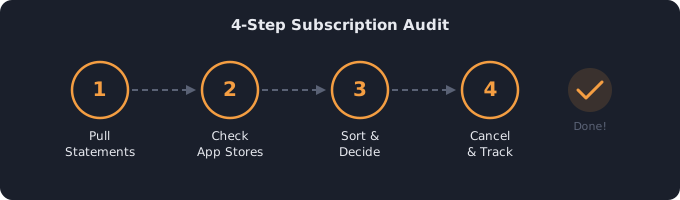
Most people discover they're paying $50–$150/month more than they thought on subscriptions. A quick 15-minute audit can find forgotten charges, identify services you barely use, and put real money back in your pocket every month.
Why Auditing Matters — The Numbers
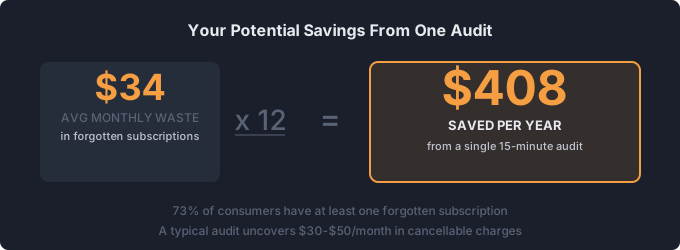
The average American pays for 4.5 subscriptions at a combined cost of $84/month, but most people guess their total is closer to $50. That gap — roughly $34/month — adds up to $408 per year in spending you did not realize was happening. Across a household with two adults, the blind spot can easily reach $600–$800 annually.
Industry data shows that 73% of consumers have at least one subscription they have forgotten about entirely. The most commonly forgotten categories are app store auto-renewals, cloud storage upgrades, and free trials that converted to paid plans. A single 15-minute audit typically uncovers $30–$50/month in charges that can be canceled or downgraded immediately — that is $360–$600 back in your pocket each year without changing your lifestyle.
Step 1: Check Your Bank & Credit Card Statements (5 min)
Pull up the last 3 months of transactions for every card and bank account you use. Search for recurring charges — look for the same amount appearing monthly. Common ones to look for: streaming services, app subscriptions, software licenses, gym memberships, meal kits, cloud storage, news/media, and gaming services.
Pay special attention to charges in the $2–$15 range — these are the ones most people overlook because they seem insignificant individually. Search your statements for keywords like "subscription," "renewal," "recurring," and "membership." Also look for company names you do not immediately recognize, as many services bill under parent company names (e.g., a Hulu charge may appear as "Disney Bundle" or a YouTube Premium charge may appear as "Google").
Do not forget to check PayPal, Venmo, or any other payment platforms where you may have set up recurring payments. These charges will not appear on your bank or credit card statements directly.
Step 2: Check App Store Subscriptions (3 min)
Both Apple and Google have subscription management pages that show active recurring charges. On iPhone: Settings → Apple ID → Subscriptions. On Android: Play Store → Menu → Subscriptions. You'll often find apps you installed once, used for a week, and forgot about — but you're still paying for.
Common culprits include weather apps ($3–$5/month), photo editors ($4–$10/month), VPN services ($5–$13/month), language learning apps ($7–$14/month), and productivity tools you tried once. The average smartphone user carries 2.4 forgotten app subscriptions totaling $8–$15/month. Also check for free trial conversions — apps that offered a 3 or 7-day trial and silently began charging when the trial ended.
Step 3: List Everything in One Place (3 min)
Write down every subscription with its name, monthly cost, and billing date. Use a free subscription tracker to see your total spend automatically, or a simple spreadsheet. The key is seeing everything together — that's when the total hits you.
For each subscription, note three things: the monthly cost (convert annual charges by dividing by 12), the last time you actually used it, and the next billing date. Group them by category — streaming, productivity, fitness, news, gaming — so you can spot overlap. Many people discover they are paying for two cloud storage services, or both Spotify and Apple Music, without realizing it.
Step 4: Sort Into Keep, Cancel, Downgrade (4 min)
For each subscription, ask: "Have I used this in the last 30 days?" If no, cancel it. If yes, ask: "Is there a cheaper tier?" Many services have ad-supported plans that cost 40-60% less. Use the 50/30/20 budget calculator to see how subscriptions fit your overall spending.
Be honest with yourself during this step. A gym app you used twice in January does not justify $14.99/month in April. A news subscription you skim once a week may not be worth $10/month when free alternatives exist. For streaming, consider whether you actually watch a service weekly or just keep it "in case something good comes out." If it is the latter, cancel now and resubscribe later when there is a specific show you want.
For services you want to keep but find expensive, check for downgrade options. Switching Netflix from Standard ($17.99) to the ad-supported plan ($7.99) saves $120/year. Dropping Spotify Family to an individual plan saves $84/year if your household members rarely use it. Small downgrades across three or four services can easily total $200–$400 in annual savings.
How Often Should You Audit?
A single audit is a great start, but subscription creep is ongoing. New free trials convert to paid plans, prices increase without notice, and you sign up for services you later forget about. The best cadence is once per quarter — four times a year.
Set a recurring calendar reminder for the first weekend of January, April, July, and October. Each quarterly audit takes just 10–15 minutes once you have your initial list built in a subscription tracker. During each check-in, look for three things: new subscriptions you have added since the last audit, price increases on existing services (companies often raise rates with minimal notice), and services your usage has dropped on. Quarterly audits prevent the slow accumulation that turns a manageable $60/month into $120/month over the course of a year.
What to Do After You Cancel
Monitor for Zombie Charges
Canceling a subscription does not always mean the charges stop. Some services continue billing due to processing delays, failed cancellation flows, or charges tied to a different billing cycle. After canceling, check your statements for 2 full billing cycles to confirm the charges have actually stopped. If a charge appears after cancellation, contact your bank to dispute it and reach out to the company's support team with your cancellation confirmation.
Check for Retention Offers
Many services will offer you a discounted rate when you attempt to cancel. Netflix, Spotify, and several fitness apps are known to present offers like 50% off for 3 months or a free month to stay. If you genuinely use the service but find it overpriced, these retention offers can be worth taking. However, set a reminder for when the promotional rate ends — companies count on you forgetting and reverting to the full price.
Redirect the Savings
Do not let saved money disappear into general spending. Redirect it somewhere specific: pay down debt, build your emergency fund, or put it toward a savings goal. Even $30/month saved is $360/year — or $1,800 over 5 years. Set up an automatic transfer for the amount you have freed up so the savings happen without relying on willpower.
Start your audit now
Add your subscriptions and instantly see what you're spending — and what you could save.
Open Free Subscription Tracker →Related tools
50/30/20 Budget Calculator — Reallocate savings from canceled subscriptions
Savings Goal Calculator — Use saved money toward a specific goal
Debt Payoff Calculator — Redirect savings to debt payoff
Related guides
Subscription Costs in 2026 — See national averages
Streaming Prices 2026 — Compare all plans