Free Alternatives to Paid Apps and Subscriptions
Published April 2026 · 9 min read
This article is for informational purposes only and does not constitute financial advice. See our full disclaimer.
The average American spends over $200 per month on app and service subscriptions they could partially or fully replace with free alternatives. Streaming, music, office productivity, design tools, cloud storage, password managers, and VPNs all have legitimate free options that deliver 80-90% of the functionality most people actually use.
The key is knowing which free alternatives are genuinely good and which ones cut too many corners. This guide breaks down the best free replacement for every major subscription category, with real monthly savings calculations so you can see exactly how much you stand to keep.
Video Streaming: Replace Netflix, Hulu, and Disney+
Paid streaming is the single biggest subscription expense for most households, often totaling $40-$70/month across multiple services. But the free streaming landscape has improved dramatically since 2024.
Tubi is the standout free option. Owned by Fox Corporation, Tubi offers over 50,000 titles including movies and TV series across every genre. The content rotates monthly, so there is always something new. It is entirely ad-supported with no premium tier, which means everything on the platform is free. Ad breaks run about 4-6 minutes per hour of content, roughly comparable to the ad-supported tiers of Netflix or Hulu.
Pluto TV takes a different approach by offering over 250 live linear channels organized by category: news, sports, comedy, reality, movies, and more. It also has an on-demand library. If you grew up with cable TV and miss the experience of channel surfing, Pluto TV recreates that feeling without costing a dime.
Other strong free options include The Roku Channel (available on any device, not just Roku hardware), Freevee from Amazon, and Kanopy, which is available free through most public library cards and offers high-quality independent films and documentaries.
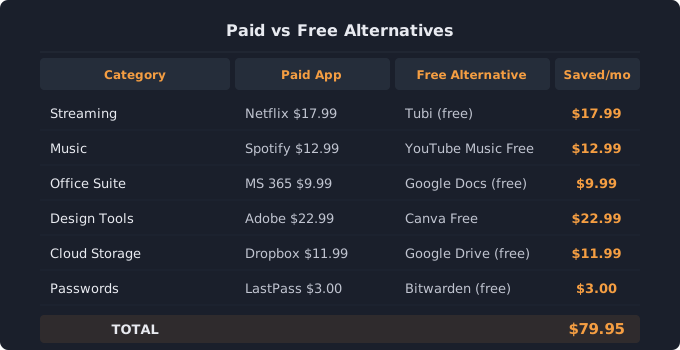
Monthly savings: Canceling Netflix Standard ($17.99), Hulu ($17.99), and Disney+ ($9.99) and switching to Tubi and Pluto TV saves $45.97/month or $551/year.
Music Streaming: Replace Spotify Premium
Spotify Premium costs $12.99/month, but there are solid free options that most casual listeners will find perfectly adequate.
YouTube Music free tier lets you search for and play any song on demand with ads. Unlike old Spotify free which forced shuffle mode on mobile, YouTube Music free gives you full control on desktop and allows background play through a browser on mobile. The catalog is massive and includes live recordings, remixes, and covers you cannot find elsewhere.
Spotify Free itself remains a viable option if you do not mind occasional ads and shuffle mode on mobile. On desktop, you get full on-demand playback. For many people, the free tier covers 90% of their listening needs.
Pandora Free is ideal if you prefer radio-style listening where you pick a station based on an artist or genre and let the algorithm handle the rest. Ad interruptions occur roughly every 15 minutes.
Monthly savings: Dropping Spotify Premium for YouTube Music free tier saves $12.99/month or $156/year.
Office and Productivity: Replace Microsoft 365
Microsoft 365 Personal costs $9.99/month ($99.99/year), but unless you need advanced Excel macros or corporate SharePoint integration, free alternatives handle everyday document work just as well.
Google Docs, Sheets, and Slides is the most polished free alternative. It runs entirely in your browser, saves automatically, and makes sharing and collaboration effortless. Most users who switch from Word and Excel to Google Docs and Sheets report no meaningful loss of functionality for personal and small business use. Google Docs also reads and writes .docx and .xlsx files, so you can exchange files with Microsoft users without compatibility problems.
LibreOffice is a free, open-source desktop suite that includes Writer (Word equivalent), Calc (Excel equivalent), Impress (PowerPoint equivalent), and Draw. It installs on Windows, Mac, and Linux and works offline. For users who prefer a traditional desktop application or need advanced spreadsheet features, LibreOffice is the stronger choice.
Monthly savings: Canceling Microsoft 365 for Google Docs or LibreOffice saves $9.99/month or $120/year.
Design and Photo Editing: Replace Adobe Creative Cloud
Adobe Creative Cloud Photography plan costs $22.99/month, and the full All Apps plan runs $59.99/month. For non-professionals, free tools now cover the vast majority of common design and editing tasks.
Canva Free handles social media graphics, presentations, flyers, resumes, and basic photo editing with thousands of templates. It runs in your browser and requires zero design experience. Canva free includes over 250,000 templates, hundreds of thousands of free photos, and basic brand kit features. For most people creating social media content, marketing materials, or personal projects, Canva free is more than sufficient.
GIMP (GNU Image Manipulation Program) is a free, open-source photo editor that offers many of the same tools as Photoshop: layers, masks, custom brushes, color correction, and plugin support. The learning curve is steeper than Canva, but for serious photo editing without a monthly fee, GIMP is the standard recommendation.
Photopea is a browser-based editor that mimics the Photoshop interface almost exactly, including support for PSD files. It is free with ads and requires no download.
Monthly savings: Replacing Adobe Photography plan with Canva free and GIMP saves $22.99/month or $276/year.
Cloud Storage: Use Your Free Tiers
Before paying for iCloud+, Dropbox, or OneDrive, check what you already have for free. Most people do not realize they are sitting on 15-20 GB of free cloud storage across services they already use.
Google Drive gives every Google account 15 GB free, shared across Drive, Gmail, and Google Photos. That is enough for thousands of documents, hundreds of spreadsheets, and a solid photo collection if you use the storage-saver quality option in Google Photos.
Combine that with Microsoft OneDrive (5 GB free), iCloud (5 GB free on Apple devices), and Dropbox Basic (2 GB free), and you have roughly 27 GB of free cloud storage without paying for any of them. Organize by category: documents in Google Drive, photos in iCloud, work files in OneDrive.
Monthly savings: Canceling a $2.99/month iCloud+ or $11.99/month Dropbox Plus plan saves $3-$12/month or $36-$144/year.
Password Managers: Replace 1Password or Dashlane
1Password costs $2.99/month and Dashlane Premium costs $4.99/month. For a password manager, you do not have to pay anything.
Bitwarden Free is a fully featured, open-source password manager that stores unlimited passwords across unlimited devices. It includes a password generator, autofill in all major browsers, and apps for iOS, Android, Windows, Mac, and Linux. Security audits are publicly available, and the encryption standard (AES-256) is the same as paid competitors. Bitwarden Free is widely recommended by security experts and technology publications as the best free password manager available.
Monthly savings: Switching from 1Password to Bitwarden free saves $2.99/month or $36/year.
VPN Services: Replace ExpressVPN or NordVPN
Paid VPN services typically cost $10-$13/month on monthly plans. If you only need a VPN for occasional use on public Wi-Fi or basic privacy, a free tier works fine.
Proton VPN Free is the only reputable free VPN with no data caps. It offers servers in five countries (United States, Netherlands, Japan, Romania, and Poland), supports one device at a time, and maintains a strict no-logs policy. Proton VPN is based in Switzerland, which has strong privacy laws, and the company has undergone independent security audits. Speeds are limited compared to the paid plan, but adequate for browsing and standard-definition streaming.
Monthly savings: Replacing a $12.99/month VPN with Proton VPN free saves $12.99/month or $156/year.
Adding Up the Total Savings
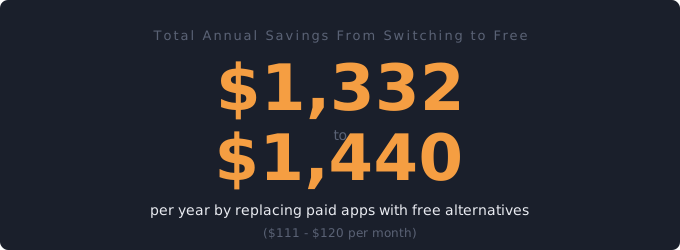
Here is what a full switch to free alternatives looks like across all categories. Streaming services save $45.97/month. Music saves $12.99. Office productivity saves $9.99. Design tools save $22.99. Cloud storage saves $2.99 to $11.99. Password manager saves $2.99. VPN saves $12.99. That brings the total potential savings to $111-$120 per month, or $1,332-$1,440 per year.
You do not have to go all-or-nothing. Even replacing two or three paid services with free alternatives can save $30-$50/month. The strategy that works best for most people: keep one or two paid services you genuinely use daily, and replace everything else with free options. Use a subscription tracker to see exactly where your money goes, then make targeted switches where the free alternative is good enough.
Find out what you are really spending
Add all your subscriptions in 2 minutes and see which ones to cut. Free, no signup required.
Open Free Subscription Tracker →Related tools
50/30/20 Budget Calculator — See how subscriptions fit your overall budget
Savings Goal Calculator — Put subscription savings toward a goal
Net Worth Calculator — See your full financial picture
Related guides
Subscription Audit Checklist — 15-min walkthrough to cut costs
Subscription Costs in 2026 — How much Americans really spend