Budget Apps vs Spreadsheets: Which Is Better?
April 2026 · 8 min read
This article is for informational purposes only and does not constitute financial advice. See our full disclaimer.
There are three main ways to manage your money in 2026: budget apps, spreadsheets, and browser-based tools. Each has real strengths and genuine drawbacks. The best choice depends on how much control you want, how much you value privacy, and whether you are willing to pay for convenience.
Here is an honest breakdown of all three approaches, with a comparison table and specific recommendations for different types of people.
Budget Apps: Convenience at a Cost
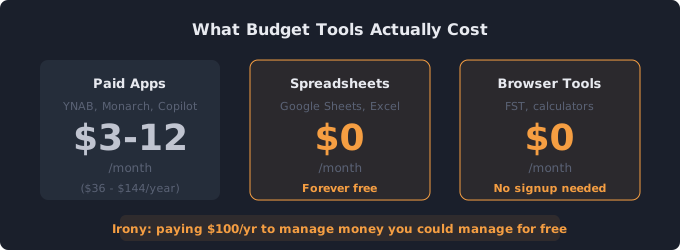
Popular budget apps like YNAB ($99/year), Monarch Money ($99/year), and Copilot ($70/year) offer a polished experience. They connect directly to your bank accounts, automatically categorize transactions, and send alerts when you overspend. For people who want their budget to update itself with minimal effort, apps are appealing.
Pros of Budget Apps
- Automatic transaction import — No manual data entry. Purchases show up categorized within hours.
- Mobile access — Check your budget from anywhere, get push notifications for large purchases.
- Visual dashboards — Charts and graphs that show spending trends over time without any setup.
- Goal tracking — Built-in features for savings goals, debt payoff tracking, and net worth monitoring.
- Shared access — Couples can manage a joint budget with separate logins.
Cons of Budget Apps
- Subscription fees — Most premium apps cost $36 to $100/year. That is money spent on managing money.
- Privacy concerns — Bank linking requires sharing login credentials with a third party. Data breaches at financial aggregators have exposed millions of accounts.
- Over-automation — When everything is automatic, many users check their budget less often and lose awareness of their actual spending habits.
- Categorization errors — Automatic categorization is wrong roughly 15-20% of the time, requiring manual corrections.
- Vendor lock-in — Your budget history lives on their servers. If the company shuts down or you cancel, exporting your data can be limited or impossible.
Spreadsheets: Full Control, Zero Cost
Google Sheets, Excel, and LibreOffice Calc give you complete control over your budget format, formulas, and data. Millions of people budget successfully with nothing more than a simple spreadsheet. There is no subscription fee, no bank linking, and no company holding your financial data.
Pros of Spreadsheets
- Completely free — Google Sheets costs nothing. Excel is often already included with work or school accounts.
- Total customization — Build exactly the budget format you want with custom categories, formulas, and layouts.
- Full data ownership — Your financial data stays on your computer or your own cloud storage. No third-party access.
- Powerful analysis — Pivot tables, charts, conditional formatting, and custom formulas let you analyze spending any way you want.
- No account required — No signups, no passwords, no email verification.
Cons of Spreadsheets
- Manual data entry — Every transaction must be entered by hand, which takes 5-10 minutes per week.
- Setup time — Building a budget spreadsheet from scratch takes 1-2 hours. Templates help but often need customization.
- No automation — No automatic imports, no push notifications, no recurring transaction detection.
- Mobile experience — Spreadsheets on phones are functional but clunky. Entering data on a small screen is tedious.
- Formula errors — One broken formula can throw off your entire budget without you noticing.
Browser-Based Tools: The Middle Ground
A growing category of tools runs entirely in your browser with no downloads, no signups, and no bank linking. Tools like FreeSubscriptionTracker and similar browser-based calculators offer structured financial planning without the privacy trade-offs of apps or the setup burden of spreadsheets.
- Free and instant — Open the page, start using it. No account creation, no email, no payment.
- Privacy-first — Data stays in your browser. Nothing is sent to a server or stored in a database.
- Purpose-built — Each tool does one thing well, whether that is tracking subscriptions, splitting a paycheck, or calculating debt payoff.
- No maintenance — No formulas to break, no app to update, no subscription to renew.
The limitation is scope. Browser tools are typically focused on a specific task rather than providing comprehensive budget management. They work best as part of a toolkit rather than a standalone solution.
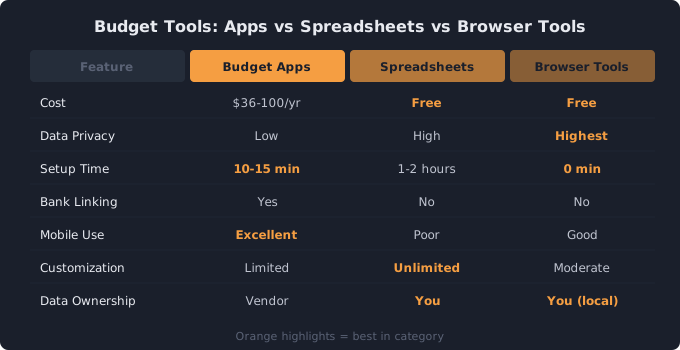
Side-by-Side Comparison
| Feature | Budget Apps | Spreadsheets | Browser Tools |
|---|---|---|---|
| Cost | $36–$100/yr | Free | Free |
| Setup time | 10–15 min | 1–2 hours | 0 min |
| Bank linking | Yes | No | No |
| Data privacy | Low | High | High |
| Customization | Limited | Unlimited | Moderate |
| Manual entry | Minimal | Required | Required |
| Mobile use | Excellent | Poor | Good |
| Data ownership | Vendor | You | You (local) |
| Learning curve | Low | Medium | Low |
Who Should Use What?
Use a budget app if you have tried budgeting before and failed because of the manual effort. If you need everything automated to stay consistent, an app's bank-linking convenience can be worth the subscription fee and privacy trade-off. Apps work especially well for couples managing shared finances.
Use a spreadsheet if you are detail-oriented, enjoy customizing systems, and value full control over your data. Spreadsheets suit people who want to analyze their spending deeply and are comfortable with the 5-10 minutes of weekly data entry. They are also the best choice for people with complex financial situations involving multiple income sources, investments, or business expenses.
Use browser-based tools if you want to get started immediately without any commitment. They are ideal for specific tasks like tracking subscriptions, planning a budget split, or calculating debt payoff timelines. Many people use a spreadsheet or app for their main budget and browser tools for targeted calculations.
The Best Approach for Most People
For most beginners, the best approach is to start with a free method. Use a 50/30/20 calculator to determine your budget split, track your subscriptions with a free tracker, and manage the rest in a simple Google Sheets template. If after 2-3 months you find that manual entry is the reason you fall off track, upgrade to a paid app.
The worst approach is spending weeks researching the perfect tool and never actually starting a budget. Any method that you use consistently will outperform the theoretically ideal method you never implement. Pick one, start today, and switch later if needed.
Track your subscriptions for free
No signup, no bank linking, no subscription fee. See your recurring costs in under 2 minutes.
Open Free Subscription Tracker →Related tools
Subscription Tracker — Track every recurring charge in one place
50/30/20 Budget Calculator — Split your income into needs, wants, and savings
Paycheck Budget Calculator — Plan your budget around your paycheck
Related guides
Budgeting for Beginners — A no-nonsense guide to your first budget
The Envelope Budgeting Method Explained — Deep dive into cash-based budgeting