Subscription vs Ownership: When to Subscribe and When to Buy
Published April 2026 · 10 min read
This article is for informational purposes only and does not constitute financial advice. See our full disclaimer.
Everything is a subscription now. Software that used to cost a flat $50 or $100 now charges $10 or $20 per month, forever. Adobe, Microsoft, music, movies, games, fitness apps, news, even car features like heated seats have moved to recurring payments. Companies love subscriptions because they create predictable revenue. But for consumers, the math does not always work out in your favor.
The question is not whether subscriptions are good or bad. It is knowing when subscribing makes financial sense and when buying outright saves you money. This guide gives you a clear framework for making that decision every time.
The Subscription Trap: How We Got Here
In 2015, most software came in a box or as a one-time download. You paid once and owned it indefinitely. Adobe Photoshop cost around $700 as a perpetual license. Microsoft Office was $150-$400 depending on the edition. These were real purchases that you controlled.
By 2026, nearly every major software company has switched to subscriptions. Adobe Creative Cloud runs $59.99/month ($719.88/year). Microsoft 365 charges $9.99/month ($99.99/year). Even utilities like antivirus software and VPNs have gone subscription-only. The shift is not accidental. Subscription models generate 2-5 times more lifetime revenue per customer than one-time purchases, according to industry analyses.
The result is that consumers now spend more on software over time than they ever did buying it outright. But that does not mean subscriptions are always the wrong choice. The key is understanding which category each purchase falls into.
When Subscriptions Make Sense
There are specific situations where paying monthly or annually is the smarter financial decision.
Frequently Updated Software You Use Daily
If you use a tool every day and it receives meaningful updates multiple times per year, subscribing can deliver genuine value. Microsoft 365 is a good example for professionals who rely on Excel, Word, and Teams. You get continuous feature updates, 1 TB of OneDrive storage, and access across all your devices. For someone who uses these tools 8 hours a day, $9.99/month is a reasonable cost for always having the latest version.
Content Libraries That Rotate
Streaming services like Netflix, Spotify, and audiobook platforms make sense as subscriptions because the content constantly changes. You are not paying for a single product but for ongoing access to a rotating library. Buying individual movies at $15-$20 each or albums at $10 each would cost far more than a monthly subscription if you consume content regularly. If you watch 10 or more movies per month, a $17.99 Netflix subscription works out to under $1.80 per movie.
Short-Term Project Needs
If you need Photoshop for a two-week project and will not touch it again for months, paying $22.99 for one month of Adobe Photography plan is dramatically cheaper than buying a perpetual alternative. Subscriptions are excellent for temporary, specific needs. The same logic applies to project management tools, specialized design software, or any professional tool you need briefly.
When Buying Outright Is Better
For many products, paying once and owning it permanently saves significant money over time.
One-Time-Use Tools and Utilities
Software you use occasionally but consistently over years is almost always cheaper to buy. A code editor, a note-taking app, a PDF editor, a file manager, or a photo organizer are tools that work fine for years without major updates. Affinity Photo costs $69.99 once and does 90% of what Photoshop does. At Adobe's $22.99/month, you hit the Affinity breakeven point in just 3 months. After that, every month of subscribing to Adobe is money lost compared to owning Affinity.
Games You Will Replay
Xbox Game Pass and PlayStation Plus offer compelling value if you try lots of different games. But for games you love and will replay for years, buying makes more sense. A $60-$70 game purchase that you play for 200+ hours over several years costs far less than maintaining a $16.99/month Game Pass subscription ($203.88/year) just for access to that one title. Buy the games you love, subscribe only when you want to explore and sample.
Books and Educational Content
Kindle Unlimited costs $11.99/month ($143.88/year). If you read 2-3 books per month from its catalog, the math works. But many avid readers find that the books they actually want to read are not included in Kindle Unlimited's catalog, forcing them to buy those books anyway while still paying the monthly fee. For most readers, buying individual ebooks at $5-$15 each or using a free public library app like Libby delivers better value.
The Math: Subscription vs. One-Time Purchase
Here is a concrete comparison for some of the most common subscription-vs-buy decisions.
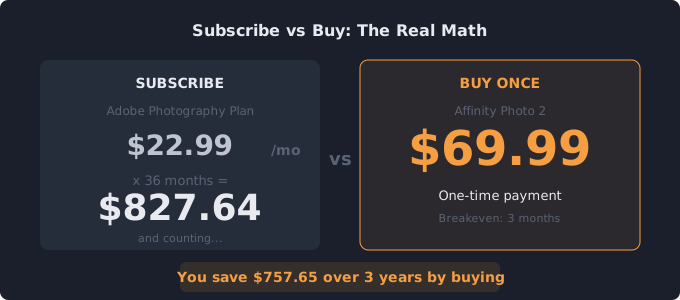
Photo editing: Adobe Photography Plan costs $22.99/month ($275.88/year). Affinity Photo 2 costs $69.99 once. Breakeven: 3 months. After one year, you have saved $205.89 by buying Affinity.
Office productivity: Microsoft 365 Personal costs $9.99/month ($99.99/year). LibreOffice is free, forever. Google Workspace is free for personal use. Every month you subscribe to Microsoft 365 when you could use free alternatives is $9.99 unnecessarily spent.
Note-taking: Notion Plus costs $10/month ($96/year). Obsidian costs $0 for personal use. Apple Notes is free. Breakeven: immediately because excellent free alternatives exist.
Music production: Splice costs $9.99/month. Buying a comparable sample pack library outright runs $200-$500. Breakeven: 20-50 months. For hobbyists, buying packs makes sense. For active producers who use new samples weekly, the subscription wins.
A Decision Framework for Every Purchase
Before subscribing to anything, run through these four questions.
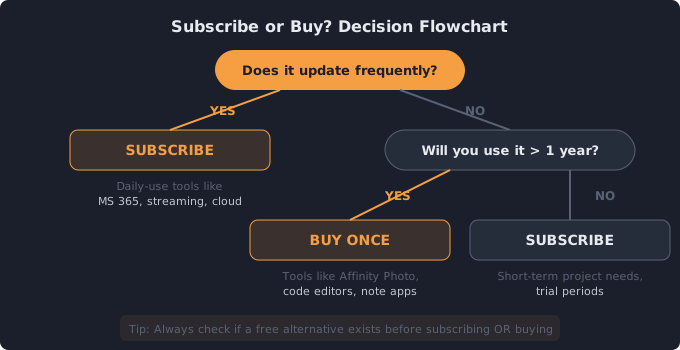
1. How often will I use it? Daily use favors subscriptions for software that updates frequently. Monthly or occasional use favors buying or free alternatives. If you have not opened an app in 3 weeks, you probably do not need to subscribe to it.
2. Does a one-time purchase alternative exist? For many subscription products, a buy-once competitor exists that covers 80-95% of the same functionality. Affinity replaces Adobe. LibreOffice replaces Microsoft Office. Bitwarden free replaces 1Password. Check before you subscribe.
3. What is the breakeven point? Divide the one-time purchase price by the monthly subscription cost. If you will use the tool longer than that number of months, buying is cheaper. If your need is shorter, subscribe.
4. Am I actually using what I am paying for? Many people subscribe to premium tiers when the free tier or a lower tier would suffice. Do you really need Spotify Premium, or does the free tier with ads cover your listening? Do you need 2 TB of iCloud storage, or would the free 5 GB work if you cleaned up your photos? Audit your usage, not just your intentions.
The Hidden Cost of Subscription Creep
The biggest danger of the subscription economy is not any single charge. It is the accumulation. One subscription at $9.99/month feels harmless. Ten of them at similar prices add up to $100/month or $1,200/year. And because each charge is small and automatic, most people never sit down to evaluate whether they are getting $1,200 worth of value.
Studies show that the average consumer underestimates their total subscription spending by $133/month. That gap exists because subscriptions are designed to be invisible. They auto-renew, they bill to cards you do not check daily, and they rely on the friction of cancellation to keep you paying.
The fix is simple: track every subscription in one place, review the list monthly, and apply the buy-vs-subscribe framework above to each one. A subscription tracker gives you that visibility in under two minutes. Once you see the real total, the decisions become obvious.
See your real subscription total
Add everything you pay for monthly and annually. Takes 2 minutes. Free, no signup.
Open Free Subscription Tracker →Related tools
Subscription Tracker — Track every subscription in one place
50/30/20 Budget Calculator — See how subscriptions fit your budget
Savings Goal Calculator — Redirect savings toward a financial goal
Related guides
Free Alternatives to Paid Apps — Replace paid subscriptions with free tools
Subscription Audit Checklist — 15-min walkthrough to cut costs